We’re excited to share that the new StreamSpell Store is officially live!
Today is the first day of our updated store experience, and we’d love to hear your feedback as we continue improving everything for streamers, creators, and everyone looking for stream overlays, widgets, transitions, and Stream Deck assets.
You can visit the new store here!

The new StreamSpell Store was redesigned with one clear goal: helping you find the products you need faster.
As our catalog keeps growing with animated stream overlays, stream widgets, Stream Deck icons, Stream Deck profiles, stream transitions, reactive overlays, and other creator tools, we wanted the store to feel cleaner, easier to browse, and more organized.
The new layout makes it easier to explore different product types, compare options, and discover new assets for your stream setup.

One of the biggest improvements is the new search experience.
The updated search bar helps you look for products by theme, style, color, game, or product type. As you type, the store can also suggest related products based on your search, making it easier to discover stream packages, alerts, widgets, emotes, transitions, and other assets that match what you are looking for.
For example, you can search for things like cute stream overlays, purple overlays, fantasy stream packages, FPS overlays, cozy widgets, or Stream Deck assets and find relevant products more easily.

We also added new filters to make browsing more practical.
Now you can filter products by:
This makes it easier to narrow down the catalog and find stream assets that match your content, branding, or visual style.
Instead of scrolling through everything, you can focus on the products that actually fit your stream setup.
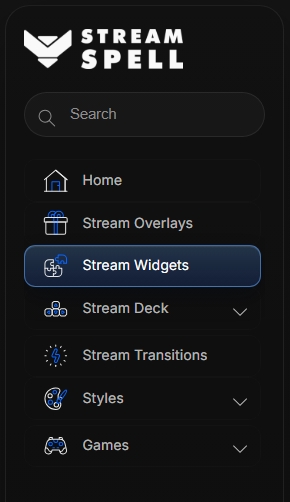
The new store also comes with a refreshed menu and improved category structure.
You can now browse our main sections more clearly, including:
This new organization was created to make the shopping experience more intuitive and help customers move between categories without getting lost.
This is only the beginning.
We’re already working on new features and improvements for the StreamSpell Store, always focused on creating a better experience for streamers and making our products easier to explore, compare, and use.
Since today is the first day of the new store, your feedback is very welcome. If you notice anything that could be improved, or if there is something you would love to see added, feel free to let us know.
Visit the new StreamSpell Store now!
Find more animated stream overlays, animated stream alerts, animated transitions, Stream Deck Icons, emotes and badges, stream widgets (Chat Box, Event List, Goal Bar), and custom stream designs:
Thank you for following our blog!
See you in the next post 💙
Learn everything about OBS Studio, Streamlabs Desktop, which streaming platforms are best, sizing guides for Twitch, YouTube and more!

© 2025 │ StreamSpell is a premium graphic, video and animation design agency for streamers and gamers. We offer free and premium stream overlays, templates, OBS scene collections, packages, alerts, widgets such as chat box, event list and goal bars, stream panels, webcam overlays, and more assets for Twitch, Kick, Youtube, Trovo and Facebook Gaming.