
GET THE WIDGET
Julia Pazin
Stream Widgets

🌱 New Stream Garden Widget: Interactive Widget for OBS & Streamlabs
If you’re looking for something different to make your stream feel more alive, this one’s for you!
StreamSpell just released a brand new interactive widget, and it’s currently free during its testing phase.
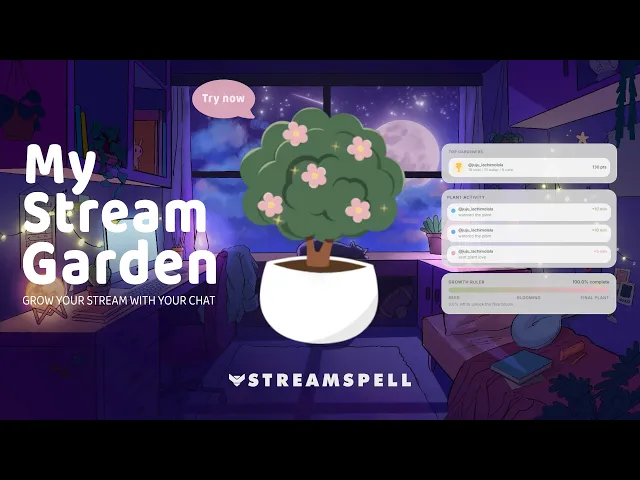
Meet the My Stream Garden Widget: a cozy, interactive plant that grows live on stream, powered by your chat.
Your viewers can actively participate using commands like:
!water!care
Each interaction helps the plant grow faster, turning your stream into a shared experience instead of just a broadcast.
Since this is a new release, it’s still evolving, and your feedback plays a big role in shaping what comes next 💙
🌿 What Is the My Stream Garden Widget?
The Stream Garden Widget is an interactive browser-source widget designed for:
Twitch streams
YouTube streams
Kick streams
It works seamlessly with:
OBS Studio
Streamlabs
StreamElements
No downloads needed. Just add it as a browser source and you’re ready to go.
🌱 4 Widgets Inside the Stream Garden System
When you set up My Stream Garden, you can enable and customize four different widgets:
1. Plant Widget
This is the main visual element of your stream garden.
You can customize:
Toggle garden title visibility
Background visibility
Background color
Background opacity
Background roundness (border radius)
Title color
How it boosts engagement:
The plant becomes a shared goal between you and your chat. Instead of being passive viewers, your audience actively helps it grow using !water and !care. This creates a sense of ownership and makes people more likely to stay, interact, and come back to check the progress.
2. Growth Ruler Widget
Tracks your plant’s progress visually.
You can customize:
Show or hide the growth ruler
Progress start color
Progress end color (gradient effect)
Text color
How it boosts engagement:
This widget turns interaction into visible progress. Every action from chat contributes to something they can see evolving in real time. It adds a subtle “progress bar psychology” effect that encourages viewers to keep interacting until the plant is fully grown.
3. Plant Activity Event List Widget
Displays chat interactions like !water and !care.
You can customize:
Show or hide event list
Text color
How it boosts engagement:
This is where recognition happens. Viewers see their usernames appear when they interact, which creates instant feedback and social validation. It encourages more people to join in just to be part of the activity showing on screen.
4. Top Gardeners Widget
Highlights your most active viewers.
You can customize:
Show/hide widget
Show/hide title
Rank background color
Background opacity
Background roundness
Card color
Card opacity
Card roundness
Title color
Text color
How it boosts engagement:
This adds a competitive and gamified layer to your stream. Viewers are naturally motivated to climb the ranking and become top gardeners. It rewards consistent interaction and makes your community feel seen and appreciated.
Typography & Behavior Settings
You also have control over global settings like:
Typography
Font family
Font size
Text style
Interaction Rules
Total growth duration (journey hours)
Minutes per
!waterMinutes per
!care
How this impacts engagement:
You can control the pacing of interaction. A faster growth cycle creates quick rewards, while a longer one builds anticipation and encourages viewers to return across multiple streams to see the final result.
Try It Free (Limited Time)
Since this widget is currently in testing phase, it’s available 100% free for a limited time.
👉 Start customizing your widget here!
💙 It’s New: Your Feedback Matters!
This is just the beginning of the Stream Garden system.
If you have:
Suggestions
Ideas
Bug reports
Feature requests
Send them to:
📩 contact@streamspell.com
Your feedback directly helps shape future updates!
Explore More Free Stream Widgets by StreamSpell
If you enjoyed the Stream Garden, there’s a lot more you can build.
Stream Widgets Hub by StreamSpell is a free no-code tool that lets you create fully customizable widgets for your stream in minutes.
No downloads, no plugins, no setup headaches. Just customize and add directly as a browser source.
You can create widgets like:
Chat Box
Event List
Goal Bar
Timer
Social Media Rotator
All designed to work smoothly with OBS, Streamlabs, and StreamElements.
👉 Start building your widgets here!
Learn More About All Available Widgets
Want a deeper look at everything you can create?
We’ve put together a full guide explaining all Stream Widgets Hub features, available widgets, and how to use them in your stream setup.
💙 Build Your Full Stream Setup with StreamSpell
Stream Widgets Hub is just one part of what StreamSpell offers. If you're building or upgrading your full stream setup, here's where to go next:
StreamSpell Store: Animated overlays, alerts, transitions, Stream Deck icons, emotes, badges, and stream widgets
Custom Design Services: Get a fully custom stream design built for your brand
StreamSpell Portfolio: See examples of stream designs and setups
StreamSpell on Etsy: Browse and buy stream assets directly on Etsy
Thank you for following our blog!
See you in the next post 💙
Level up your stream with practical guides for OBS, Twitch, YouTube and Stream Deck.

AI Stream Deck Profile Generator: Build Profiles Faster
Build Stream Deck profiles faster with Deck Smith, a free AI Stream Deck profile generator by StreamSpell.

40 Webcam Overlay Bundle by StreamSpell
Get 40 stream-ready webcam overlays with animated styles, color customization, and themes like anime, neon, RPG, cute, and more.

5 Strategies for Staying Motivated as a Content Creator
Take care of yourself with these quick tips for staying motivated throughout your content creation journey.
Browse All Articles
Browse Stream Overlays