VIEW DEALS

streaming-guides
Best OBS Scene Collections by StreamSpell: How to Install Them with Elgato Marketplace Connect
⚡ New from StreamSpell: Deck Smith — AI-powered Stream Deck Profile Builder. Type one prompt, get a download-ready profile for any device. Try it free →
If you've ever felt overwhelmed by creating the perfect OBS setup, you're not alone. With Elgato Marketplace Connect, streamers can install ready-to-use scene collections—featuring StreamSpell's best overlays—in just a few clicks. No more juggling multiple plugins or hunting for missing assets; this plugin streamlines everything so you can go live faster and look amazing from day one.
In this guide, we'll show you:
How Elgato Marketplace Connect works
Step-by-step installation (Windows-only)
Our top StreamSpell scene collections
Tips for customizing your OBS layout
Let's jump in!
What Is Elgato Marketplace Connect for OBS?
Elgato Marketplace Connect is a free OBS plugin that simplifies the process of installing complete scene collections. Rather than manually importing overlays, alerts, and plugins, Marketplace Connect pulls everything together in one streamlined workflow. The plugin guides you through installing any missing components and then auto-configures your scenes—perfect for new streamers or anyone wanting a hassle-free setup.
Key Benefits of Using Elgato Marketplace Connect
Fast Setup: No more endless tinkering—just pick a scene collection and go live.
All-in-One Installation: Marketplace Connect handles plugins, devices, and overlay files, reducing potential errors.
Customization on Demand: You can still fine-tune layouts, add or remove sources or filters, and tweak designs whenever you like.
Community Sharing: Share your own custom scene collections with others, or discover new styles to keep your stream fresh.
How to Install and Use Elgato Marketplace Connect
Download the Plugin
Go to the and get the Marketplace Connect plugin for OBS.
Open in OBS
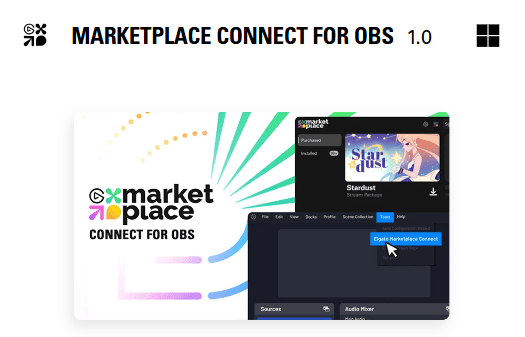
Launch OBS, then go to Tools > Elgato Marketplace Connect > Settings > Turn on maker tools.
Pro Tip
: Ensure you're using the latest OBS version for best performance.
Find the theme you want
Go to our store and select the OBS Scene Collections menu on the left.
Complete your purchase and download your files.
Install Required Assets
On OBS, select Tools > Import Maker Scene Collection and select the .elgatoscene file inside the Tutorials folder.
Go Live or Customize
Once the installation is done, your new scenes will appear in OBS. Take your time to explore the scene setup we've prepared for you.
Make any tweaks you'd like—resize elements, add personal flair, or change transitions—then hit Start Streaming!
Best StreamSpell Scene Collections for OBS
Below are some of our fan-favorite scene collections, all available through the Marketplace Connect plugin. Each collection comes fully loaded with overlays, intermission screens, and matching widgets to fit your vibe.
Relaxing, chill aesthetics perfect for focus streams, study sessions, or calm gaming nights.
A dynamic, hero-inspired design that brings epic flair to any broadcast.
Rugged Norse elements, heavy runic themes, and powerful visuals for an unforgettable presence.
Soft, ethereal designs featuring blossoms and gentle animations for a serene look and feel.
Bright, neon-lit overlays with heart-themed animations—a fun choice for vibrant channels.
Lightning-infused visuals channeling the might of the gods—ideal for epic gaming or talk shows.
Fiery graphics and bold animations that ignite the screen, amping up the energy in your stream.
Sleek, katana-inspired visuals that capture the spirit of ancient warriors.
Subtle nighttime vibes with celestial motifs—perfect for late-night streamers.
Viking Ragnarok Stream Package
A dramatic collection steeped in Norse mythology, featuring intense transitions and runic designs.
Viking Valhalla Stream Package
Another Nordic classic—expect epic halls, majestic fonts, and a truly legendary vibe.
Futuristic overlays with modern, tech-centric designs to give your channel a cutting-edge feel.
Stylish geometric shapes and clean transitions, perfect for a minimalistic yet high-tech look.
Competitive, team-focused branding with a professional look—great for tournament streams or squad play.
Customizing Your Scene Collection
After installing your chosen package via Marketplace Connect, you can still make it your own:
Adjust Sources: Move or resize your webcam, chat box, and alerts.
Swap Out Images: Want a unique logo? Replace the placeholder image with your own branding.
Add Filters & Transitions: Apply filters to webcams or add stinger transitions to highlight scene changes.
Incorporate Widgets: Integrate alert boxes, donation trackers, or follower goal bars for extra engagement.
Where to Learn More and Download
Ready to transform your broadcast?
Check out the Elgato Marketplace Connect plugin to download and start using these StreamSpell scene collections immediately.
Visit our StreamSpell Blog for additional tips, tutorials, and behind-the-scenes looks at our design process.
Conclusion & Next Steps
With Elgato Marketplace Connect and StreamSpell's scene collections, building a professional-grade stream is easier than ever. Whether you prefer the chill vibes of Lofi Night or the legendary energy of Viking Ragnarok, there's a design here for everyone. Install your favorite package, customize to taste, and captivate your audience—no technical headaches required.
Thanks for reading! We can't wait to see how you elevate your channel. For more guides and exclusive designs, stay tuned to our blog and keep exploring the StreamSpell catalog on the Marketplace.
Happy streaming!
FAQ
Is Elgato Marketplace Connect free?
Yes, the plugin is free to download and use on Windows.Can I use these scene collections without the plugin?
Absolutely—though you'll need to install them manually. Marketplace Connect just makes the process smoother.Do I need a powerful PC to run these scenes?
Most StreamSpell packages are optimized for performance, but always check if your system meets OBS requirements.Can I share my custom scene collection?
Yes! Create your own setup and share it on the Elgato Marketplace for others to enjoy.
🎮 Build Your Stream Deck Profile with AI
StreamSpell also just launched Deck Smith — an AI-powered Stream Deck Profile Builder. Just type a prompt and get a complete, download-ready Stream Deck profile adapted for any device.
Level up your stream with practical guides for OBS, Twitch, YouTube and Stream Deck.

AI Stream Deck Profile Generator: Build Profiles Faster
Build Stream Deck profiles faster with Deck Smith, a free AI Stream Deck profile generator by StreamSpell.

40 Webcam Overlay Bundle by StreamSpell
Get 40 stream-ready webcam overlays with animated styles, color customization, and themes like anime, neon, RPG, cute, and more.

5 Strategies for Staying Motivated as a Content Creator
Take care of yourself with these quick tips for staying motivated throughout your content creation journey.
Browse All Articles
Browse Stream Overlays