
VIEW DEALS
Julia Pazin
Stream Widgets, QR Code, Social Media

Growing a channel is not only about the time someone spends watching your stream. The people who follow your Instagram, join your Discord, visit your store, or come back for your next upload are the ones who stay connected after the broadcast ends.
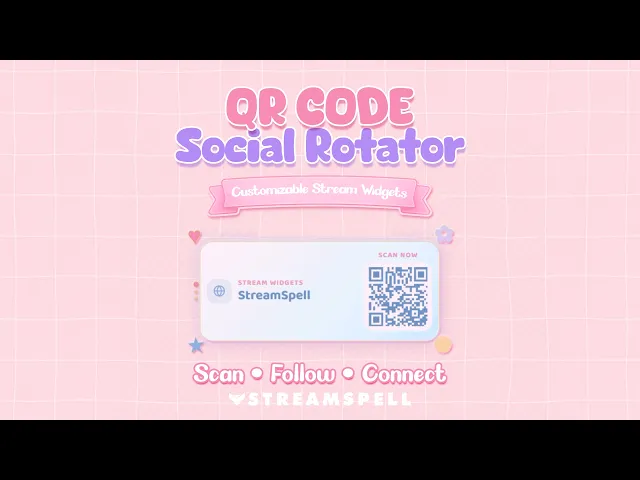
The QR Code Social Rotator Widget gives viewers a simple way to find those places without covering your scene with a wall of links. It displays one scannable destination at a time, then rotates to the next profile or custom URL you choose.
What Is the QR Code Social Rotator Widget?
This hosted StreamSpell widget places rotating social media QR codes directly on your broadcast. Add the profiles, communities, websites, stores, or custom links that matter to your channel, then let viewers open each destination with a quick scan from their phone.
It is designed for creators who want to make it easier for viewers to follow, join, discover, and support their work across platforms without interrupting the stream experience.
QR Code Social Rotator Widget
Get the QR Code Social Rotator Widget from StreamSpell. It is a customizable, hosted Browser Source widget, so there are no files to download, import, or install as a plugin.
Turn one stream space into several useful links
Set up multiple destinations and choose how they rotate on screen. You can share social profiles, a Discord invite, a website, a portfolio, a Linktree, Ko-fi, Patreon, a store, or another custom URL. Each QR code is generated from the link you add.
The complete social card can show a platform icon, platform name, username, QR code, and optional scan text. For a more compact scene, switch to QR Only Mode.
Customize the widget around your channel
A QR code does not need to look out of place in your overlay. The widget includes horizontal and square layout options, along with controls for colors, fonts, icons, borders, glow effects, QR styles, sizing, spacing, transitions, animation timing, and animated decorations.
Start with one of the included looks, such as Sunday Glow, Cherry Blossom, Midnight Spell, Soft Breeze, or Marshmallow Sky, then adjust it to match your own palette and scene design.
Where a Social QR Code Works Best on Stream
The QR Code Social Rotator Widget fits naturally into Starting Soon, BRB, Intermission, Just Chatting, gameplay, podcasts, watch parties, end screens, and vertical layouts. It can be especially useful when you mention a new video, an upcoming community event, a store launch, or a Discord activity and want viewers to reach the link without typing it in chat.
Because the widget uses a Browser Source URL, it works with OBS Studio, Streamlabs Desktop, StreamElements, Meld Studio, XSplit, Lightstream, and other streaming software that supports Browser Source URLs. It can be used on Twitch, YouTube, Kick, Facebook Gaming, and TikTok LIVE setups that run through compatible streaming software.
Quick Setup for OBS and Streamlabs
Log in to the StreamSpell Widget Hub and create your QR Code Social Rotator.
Add your profiles, usernames, and destination links.
Customize the layout, colors, QR style, decorations, and animations.
Save the widget and copy its Browser Source URL.
Paste that URL into your streaming software, then resize and position it in your scene.
Test each QR code with a phone before going live.
You can return to the Widget Hub to edit a saved widget anytime. An internet connection is required while streaming, and a StreamSpell Widget Hub account is required to use this hosted widget.
More Ways to Keep Your Community Connected
If you prefer to rotate visible social handles instead of QR codes, take a look at our Social Rotator Widget guide. It is a different way to keep social profiles present in your layout while preserving a clean stream design.
The QR Code Social Rotator Widget is built for the moments when a viewer is ready to take action. Give them a clear, scannable path to your next piece of content, your community, or your store, right from the stream.
Need More Stream Widgets?
Looking for more tools to bring your stream together? The StreamSpell Widget Hub includes free Browser Source widgets such as Chat Box, Event List, Goal Bar, Timer, Social Media Rotator, Spin Wheel, Slot Machine, and Bingo Card.
The Hub also offers premium options, including the Spotify Widget, My Stream Garden, World Cup Widget Pack, Bookish Pack, Subathon Widget, Giveaway Widget, and QR Code Social Rotator. Explore the Widget Hub to choose the tools that fit your channel, then add each widget to your scenes with its Browser Source URL. For a closer look at the free collection, read our guide to free no-code stream widgets for OBS, Streamlabs, and StreamElements.
Looking for more ways to upgrade your stream?
Find animated stream overlays, stream alerts, transitions, Stream Deck assets, emotes, badges, widgets, and custom stream design options through StreamSpell:
Thanks for reading!
See you in the next post!
Level up your stream with practical guides for OBS, Twitch, YouTube and Stream Deck.

AI Stream Deck Profile Generator: Build Profiles Faster
Build Stream Deck profiles faster with Deck Smith, a free AI Stream Deck profile generator by StreamSpell.

40 Webcam Overlay Bundle by StreamSpell
Get 40 stream-ready webcam overlays with animated styles, color customization, and themes like anime, neon, RPG, cute, and more.

5 Strategies for Staying Motivated as a Content Creator
Take care of yourself with these quick tips for staying motivated throughout your content creation journey.
Browse All Articles
Browse Stream Overlays