
VIEW DEALS
Julia Pazin
Event Countdown Widget, Stream Widgets, OBS Studio, Streamlabs, StreamElements

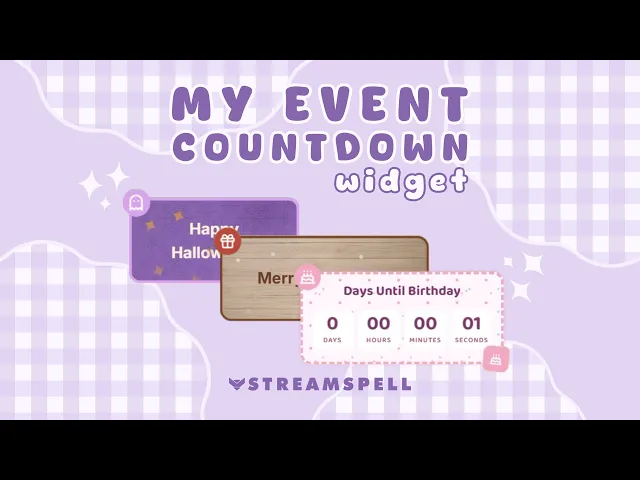
A countdown on your stream can turn an ordinary date into something viewers look forward to. The Event Countdown Widget by StreamSpell lets you place a customizable timer directly in OBS, Streamlabs, StreamElements, and other browser-source setups.
Use it for a game release, birthday, channel anniversary, tournament, charity stream, holiday special, product launch, watch party, or any moment worth sharing with your community.
What Is the Event Countdown Widget?
The Event Countdown Widget is a customizable countdown timer made for livestream layouts. Choose a target date and time, select a themed skin, adjust the visual style, and add the widget to your stream scene.
When the countdown reaches zero, you can display a custom completed message and celebrate the moment with your community. The widget is hosted online and added through a Browser Source URL, so there is no coding, plugin, or widget file download required.
Countdown Display Modes
Different events need different levels of detail. For a long-term countdown, you may only want to show the number of days remaining. For a launch-day stream, you may want to show hours, minutes, and seconds.
The Event Countdown Widget lets you choose between:
Days
Days, hours, and minutes
Days, hours, minutes, and seconds
You can also add a custom title that explains what the countdown is for, such as a game release, birthday stream, Halloween event, Christmas special, tournament, or community celebration.
Custom Message When the Countdown Ends
The countdown does not need to simply stop at zero. Create a personalized message for launch moments, birthday reveals, event starts, charity milestones, and special broadcasts.
You can preview and test the completed state before going live, helping you make sure everything looks right before your audience sees it.
Countdown Skins for Different Events
The widget includes four themed skins, each designed for a different type of event.
Calendar Skin
The Calendar skin is ideal for launches, updates, milestones, premieres, upcoming events, and special broadcasts. It works well for game releases, tournament dates, new content drops, product launches, stream debuts, and important channel moments.
Birthday Skin
The Birthday skin is made for birthday streams, channel anniversaries, community milestones, and celebration events. It is a strong option for personal streams, creator anniversaries, subscriber goals, and special days shared with your community.
Christmas Skin
The Christmas skin is perfect for holiday streams and seasonal broadcasts. Use it for Christmas events, festive watch parties, holiday giveaways, December streams, or end-of-year community celebrations.
Halloween Skin
The Halloween skin is made for spooky streams, horror events, and October-themed content. It fits Halloween specials, horror game marathons, costume streams, themed community nights, and seasonal countdowns.
Customization Options
The Event Countdown Widget gives you control over the look of your timer, so it can match your stream layout instead of feeling like a generic countdown.
You can customize colors, fonts, text sizes, borders, icons, glow effects, background patterns, pattern color and opacity, corner decorations, and completed countdown effects. You can also choose between continuous and dashed borders, adjust border color and thickness, and select separate icons for the upper-left and lower-right corners.
Depending on the skin, you can add patterns such as Wood Grain, Dots, Snowflakes, Christmas, Cobweb, or Gingham. You can show or hide icon badges and customize the binders on the Calendar skin. When the countdown finishes, celebrate with customizable stars or confetti.
Perfect for Game Releases and Stream Events
The Event Countdown Widget is especially useful for gaming creators who want to prepare their audience for upcoming content. Use it for game releases, major updates, tournaments, premieres, DLC launches, watch parties, special broadcasts, community events, charity streams, seasonal streams, birthdays, anniversaries, product launches, and channel milestones.
Add a countdown to your Starting Soon scene before a launch-day stream, place it on a Just Chatting scene while discussing an upcoming game, or use it during a community event to show exactly when the next activity begins.
Works with OBS, Streamlabs, StreamElements, and More
The Event Countdown Widget is added through a Browser Source URL, making setup simple across popular streaming apps. It works with OBS Studio, Streamlabs Desktop, StreamElements, Meld Studio, XSplit, and Lightstream.
Use it on livestreams for Twitch, YouTube, Kick, Facebook Gaming, and TikTok LIVE. Since the widget is hosted online, you do not need to download widget files or install extra plugins. Customize your countdown, copy the Browser Source URL, and add it to your streaming software.
Looking for More Stream Widgets?
Explore the StreamSpell Widget Hub to find customizable widgets for OBS, Streamlabs, and StreamElements, including chat boxes, event lists, goal bars, timers, social media rotators, spin wheels, slot machines, bingo cards, to-do lists, Spotify widgets, leaderboards, and more.
If you want more ideas, read our 4 Cute & Powerful Stream Widgets guide and our QR Code Social Rotator Widget guide.
Build Anticipation on Your Stream
Important dates are more exciting when your community can count down with you. The Event Countdown Widget by StreamSpell helps you keep upcoming events visible, match the timer to your stream style, and celebrate the exact moment your countdown reaches zero.
Use it for game launches, holiday streams, birthdays, anniversaries, special broadcasts, and any moment you want your viewers to look forward to.
Looking for more ways to upgrade your stream?
Find animated stream overlays, stream alerts, transitions, Stream Deck assets, emotes, badges, widgets, and custom stream design options through StreamSpell:
Thanks for reading!
See you in the next post!
Level up your stream with practical guides for OBS, Twitch, YouTube and Stream Deck.

AI Stream Deck Profile Generator: Build Profiles Faster
Build Stream Deck profiles faster with Deck Smith, a free AI Stream Deck profile generator by StreamSpell.

40 Webcam Overlay Bundle by StreamSpell
Get 40 stream-ready webcam overlays with animated styles, color customization, and themes like anime, neon, RPG, cute, and more.

5 Strategies for Staying Motivated as a Content Creator
Take care of yourself with these quick tips for staying motivated throughout your content creation journey.
Browse All Articles
Browse Stream Overlays