VIEW DEALS

Daniel Mayhe
Reactive Overlays, Streamlabs, streaming-guides

Streamlabs just launched the Game Pulse Widget, a new reactive overlay that can play animations on stream when in-game events happen (for supported games). Instead of a static overlay, Game Pulse reacts to your match, triggering visuals automatically when key moments happen.
If you want that reactive “live HUD” feel without building anything from scratch, grab one of our ready to use Game Pulse themes below.
TLDR: Pick your game theme, install it in Streamlabs Desktop, and your overlay starts triggering animations during gameplay.
Get StreamSpell Game Pulse Themes
Want matching overlays beyond Game Pulse?
Shop StreamSpell Stream Overlays
What the Game Pulse Widget actually does
Game Pulse is a Streamlabs reactive overlay system that detects supported in-game events and then plays an on-stream animation automatically. It’s made for moments your viewers care about, so your stream visuals “celebrate” big plays without you touching anything.
Here’s how our themes use Game Pulse:
BF6 Game Pulse Theme
Triggers animations for Victory and Kill Streaks: 5+ kills, 10+ kills, and 20+ kills.Valorant Game Pulse Theme
Triggers animations for Victory and Kill Streaks: 5+, 10+, and 20+.Fortnite Game Pulse Theme
Triggers animations for Victory and Shield Up (when you pop a shield in-game).
Requirements
Streamlabs Desktop
Game Pulse Widget enabled in Streamlabs
A supported game for Game Pulse (Streamlabs updates this list over time)
Streamlabs’ official setup guide is here:
How to set up the Game Pulse Widget
How to set up Game Pulse in Streamlabs Desktop
Open Streamlabs Desktop and load the scene where you want the widget.
Click the + Icon next to Sources and select Game Pulse Widget from the Widgets/Apps list.
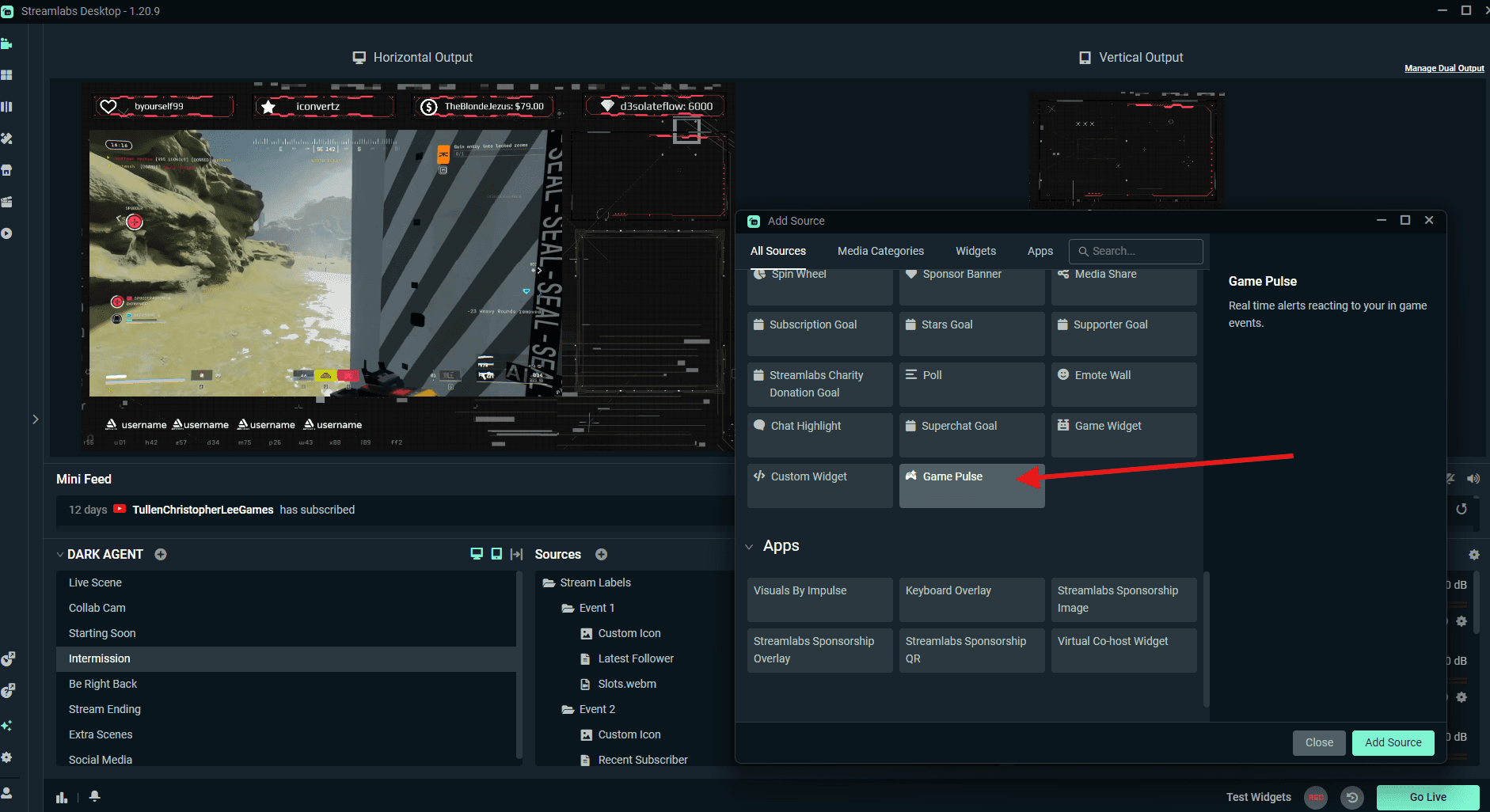
Check the triggers imported through your active Widget Theme on Streamlabs. A preview of the animation will be playing under Action Settings.

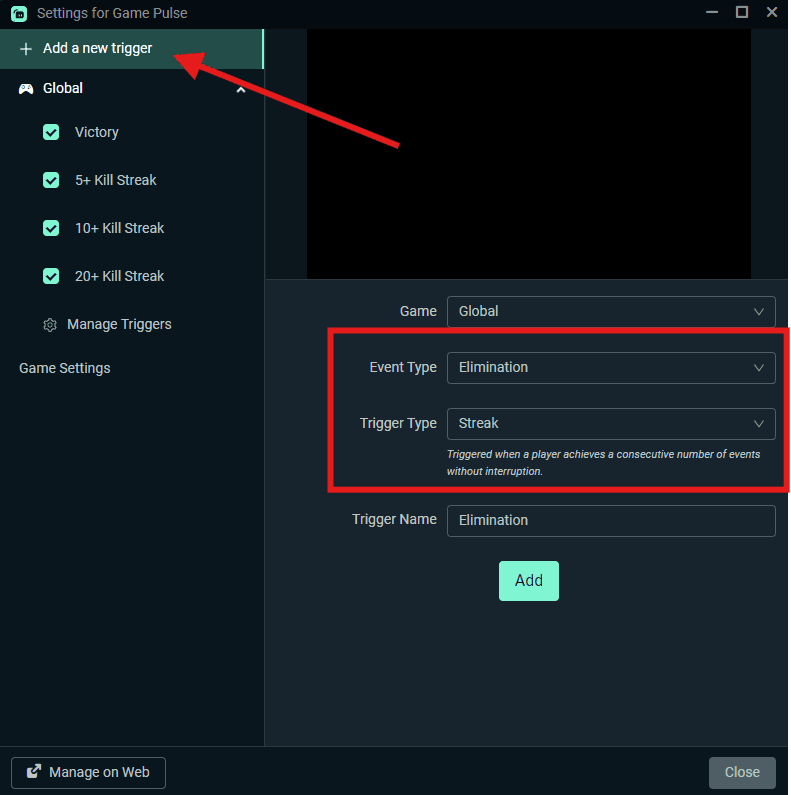
You can click Add a new trigger on the top left and create your very own reaction to in-game events under Event Type and Trigger Type, such as Victory Streak, Defeat, Eliminations and more.
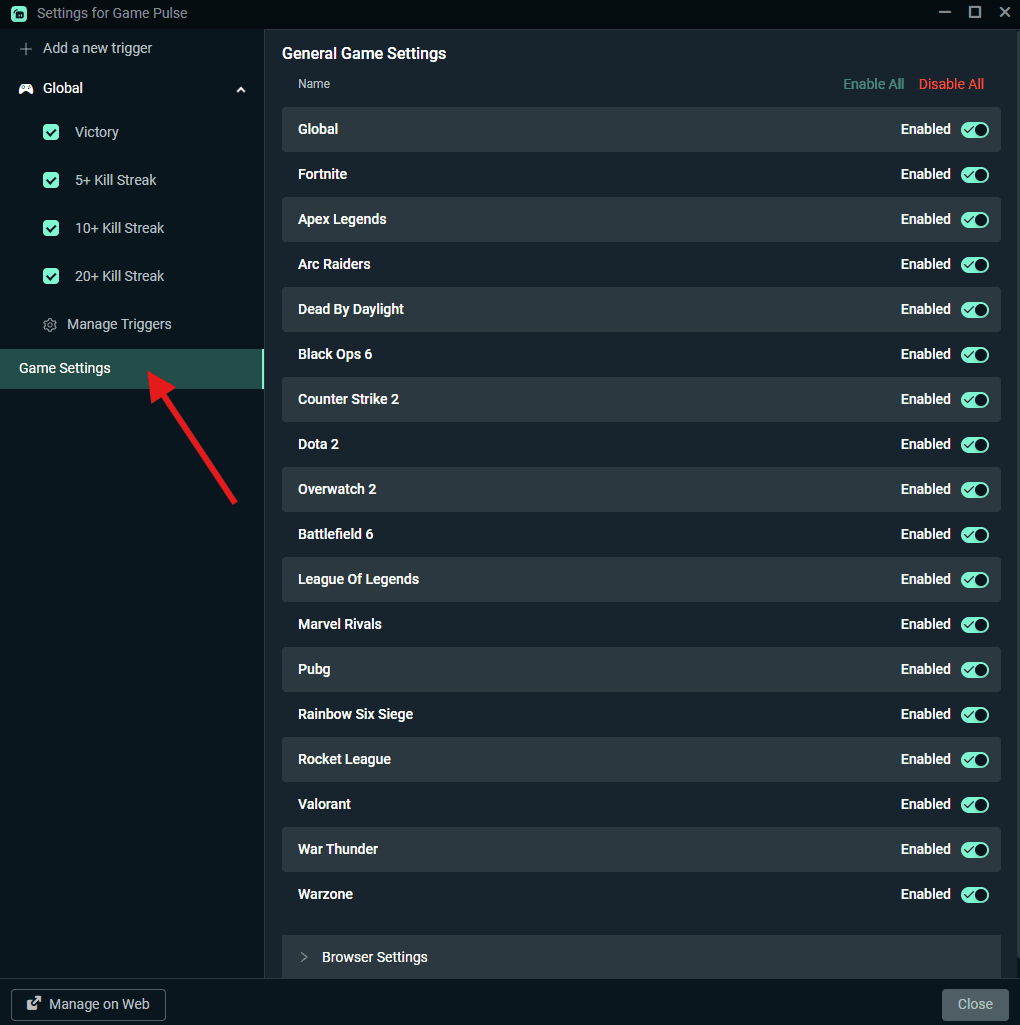
Open Game Settings to choose which games can trigger your Game Pulse animations. Toggle each game on or off to match your stream’s vibe. For example, you can keep electric, cartoony Victory animations for Fortnite while running clean sci-fi HUD effects for Valorant.
Game Pulse vs normal overlays
Game Pulse plays animations based on supported in-game events.
Normal overlays are your stream’s full visual package (screens, webcam overlays, alerts, stingers, labels).
Best setup: Game Pulse + a matching overlay pack so your whole stream looks consistent, not just one widget.
If you want the full look:
Shop StreamSpell Stream Overlays
Why use a Game Pulse theme?
It turns highlights into moments. Big plays (Victory, streaks, Shield Up) get an instant on-screen payoff, so clips feel more dramatic and shareable.
It rewards gameplay without extra effort. You don’t have to hit hotkeys or remember transitions. The stream reacts for you while you stay locked in.
It trains viewers to pay attention. A consistent visual “hit” on key events conditions chat to react, spam emotes, and stay engaged longer.
It makes your stream feel premium even on quiet days. When gameplay is slow, those reactive bursts keep the broadcast from feeling flat.
It creates a signature look. The same event triggers always fire in your style, so people recognize your stream instantly across TikTok/Shorts clips.
Which theme should you pick to get started?
Pick the one that matches your main game:
FAQ
Does Game Pulse work in OBS Studio?
No. Game Pulse is a Streamlabs Desktop feature. If you stream on OBS Studio, use standard overlays instead:
StreamSpell Stream Overlays
Do I need to install anything besides Streamlabs Desktop?
No. You just need Streamlabs Desktop and the Game Pulse Widget, then apply one of the themes above.
Do these triggers work in every game?
No. Game Pulse only reacts inside supported games. Streamlabs updates the supported game list over time.
Where do I get help if something does not work?
Start with Streamlabs’ official setup guide:
How to set up the Game Pulse Widget
⚡ New from StreamSpell: Deck Smith — AI-powered Stream Deck Profile Builder. Type one prompt, get a download-ready profile for any device. Try it free →
🎮 Build Your Stream Deck Profile with AI
StreamSpell also just launched Deck Smith — an AI-powered Stream Deck Profile Builder. Just type a prompt and get a complete, download-ready Stream Deck profile adapted for any device.
Level up your stream with practical guides for OBS, Twitch, YouTube and Stream Deck.

AI Stream Deck Profile Generator: Build Profiles Faster
Build Stream Deck profiles faster with Deck Smith, a free AI Stream Deck profile generator by StreamSpell.

40 Webcam Overlay Bundle by StreamSpell
Get 40 stream-ready webcam overlays with animated styles, color customization, and themes like anime, neon, RPG, cute, and more.

5 Strategies for Staying Motivated as a Content Creator
Take care of yourself with these quick tips for staying motivated throughout your content creation journey.
Browse All Articles
Browse Stream Overlays