VIEW DEALS

Daniel Mayhe
Stream Widgets, StreamElements

RPG Stream Widgets: 10 Custom Widgets for OBS, Streamlabs, Twitch and YouTube
If your stream feels like an adventure, your widgets should look like part of the quest.
RPG Stream Widgets is a customizable StreamElements widget pack made for streamers who want their chat, goals, alerts, timers and engagement tools to feel like they belong inside a fantasy RPG interface.
Instead of plain default boxes, you get parchment panels, gold frames, quest-inspired layouts, party-style alerts and interactive widgets designed for OBS Studio, Streamlabs Desktop, StreamElements, Twitch, YouTube, Kick and any platform that supports Browser Sources.
The pack includes 10 customizable widgets:
Chat Box
Quest Log / Todo List
Goal Bar
Subathon Timer
Timer
Bingo Board
Spin Wheel
Event List
Stream Alerts
Social Rotator
No coding required. Import the widgets into StreamElements, customize them, copy the widget link and paste it into your streaming software as a Browser Source.
What Are RPG Stream Widgets?
RPG Stream Widgets is a fantasy-themed widget bundle for creators who want their stream to look more immersive, polished and interactive.
The design is inspired by classic RPG interface elements: quest logs, parchment cards, gold trims, roleplay-style alerts, party messages, progress bars and fantasy menu details.
It works especially well for RPG streams, MMO streams, fantasy games, tabletop-inspired content, challenge runs, community events, cozy adventure streams and variety creators who want a themed overlay style.
If you already use StreamElements widgets in OBS or Streamlabs, this pack gives your stream a much stronger visual identity without forcing you to build anything from scratch.
You can also browse more stream widgets for OBS and Streamlabs from StreamSpell.
What’s Included in the RPG Stream Widgets Pack?
The pack includes 10 StreamElements widgets built around one cohesive RPG theme.
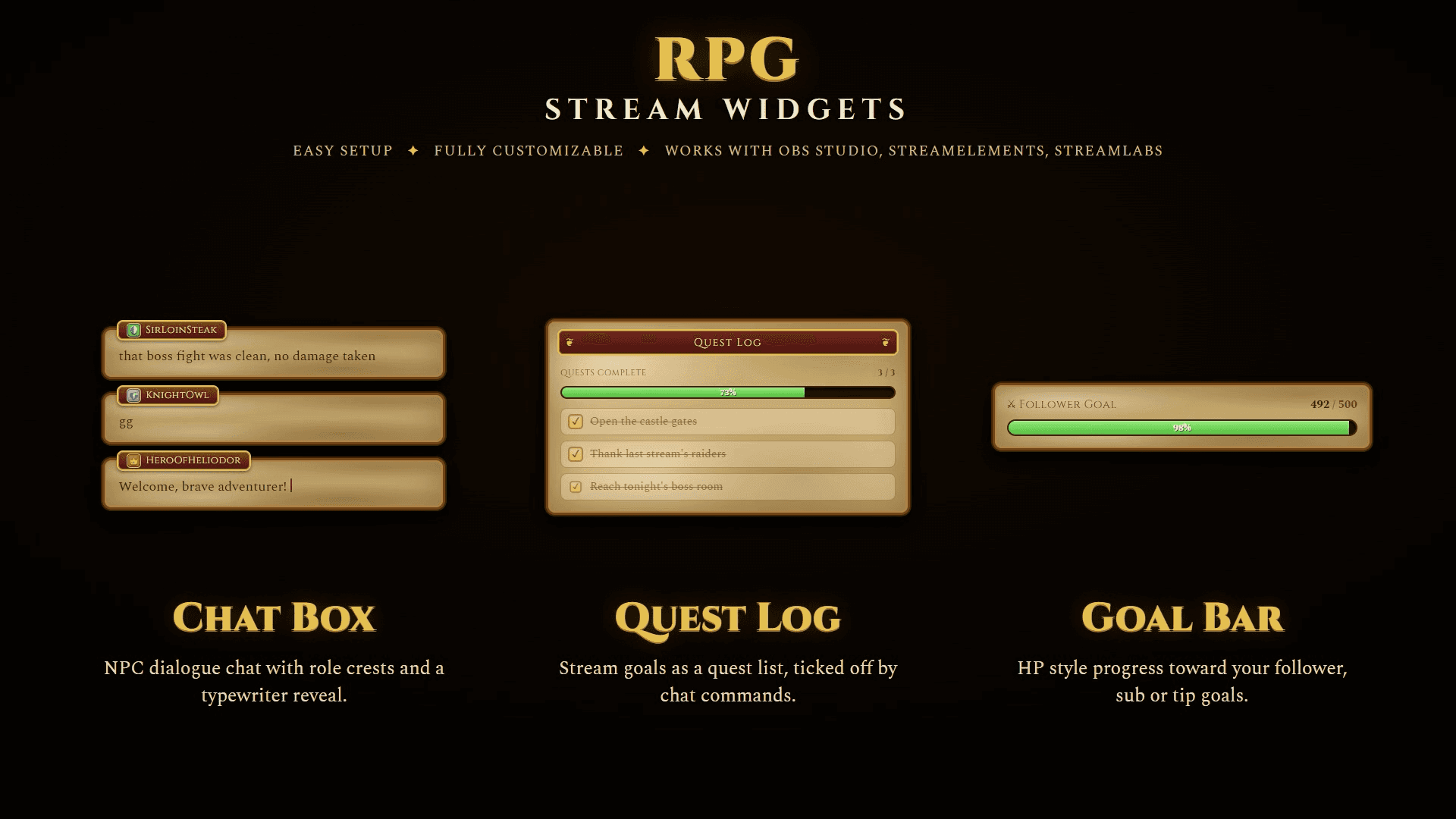
Chat Box
The Chat Box turns your stream chat into an RPG dialogue feed.
Messages appear inside parchment-style speech panels, with username badges and role crest details that make chat feel like NPC dialogue or party banter.
It is a strong fit for streamers who want chat to feel like part of the world instead of a default overlay sitting on top of the stream.
Quest Log / Todo List
The Quest Log works like a stream todo list.
You can use it for community goals, stream objectives, challenge runs, campaign tasks or anything you want viewers to follow during the broadcast.
Examples:
Defeat tonight’s boss
Reach the next level
Complete three quests
Hydrate after every dungeon
Finish a viewer challenge
The RPG framing makes simple tasks feel more engaging because viewers are not just watching a list. They are following the quest.
Goal Bar
The Goal Bar gives your stream goals an HP-style progress bar.
Use it for follower goals, sub goals, tip goals, cheer goals or custom objectives. It fits naturally with the RPG theme because it looks less like a generic progress tracker and more like part of the game UI.
For creators building a themed setup, this is a cleaner alternative to using a default progress bar that clashes with the rest of the overlay.

Subathon Timer
The Subathon Timer is built for timed events where subs, tips or cheers increase the clock.
It keeps the RPG look while giving viewers a clear reason to contribute. The timer works well for subathons, community events, marathon streams and special campaigns.
Timer
The Timer is a clean countdown widget with an RPG-style layout and progress bar.
Use it for breaks, boss attempts, speedrun segments, queue timers, raid countdowns or timed community challenges.
Bingo Board
The Bingo Board adds a 5 by 5 quest-style board to your stream.
It can be used for game-specific bingo, community chaos boards, challenge streams, random events or recurring jokes that viewers can track during the stream.
Examples:
First crit
Rare drop
Boss defeated
Chat says lore
Wrong turn
Final boss
First win
It is one of the best widgets in the pack for increasing viewer interaction because it gives chat something to watch, predict and react to.
Spin Wheel
The Spin Wheel is a fantasy prize wheel with editable slots and a spin command.
Use it for rewards, punishments, viewer challenges, random decisions, game modifiers or community events.
Examples:
Hydrate
No armor run
Boss fight
Slime time
Chat chooses
Bonus reward
This is the kind of widget that gives viewers a reason to stay active in chat instead of passively watching.

Event List
The Event List shows recent follows, subs, tips and raids in a parchment-style feed.
Instead of a plain activity feed, your recent events become part of the RPG theme. Follows become new allies, tips become gold, subs become blessings and raids become party arrivals.
That small change makes the stream feel more designed and more memorable.
Stream Alerts
The Stream Alerts widget includes animated alerts for follows, subs, cheers and raids.
The alerts match the same RPG visual system as the rest of the pack, so your stream does not feel like a mix of disconnected widgets from different sources.
Social Rotator
The Social Rotator displays rotating cards for your social links.
Use it to promote Twitch, YouTube, Kick, Discord, Instagram, TikTok or any other destination you want viewers to remember.
Instead of a static social panel, it works like a rotating RPG notice board with a call to action.
Why RPG Stream Widgets Are Better Than Default Widgets
Default widgets usually work, but they rarely feel special.
They show information, but they do not add much to the stream’s identity. If your stream has a fantasy, RPG, MMO or adventure theme, default widgets can feel out of place.
RPG Stream Widgets solves that by making the functional parts of your stream feel like part of the world.
Your chat becomes dialogue.
Your goals become quests.
Your alerts become party events.
Your timer becomes a campaign mechanic.
Your event list becomes an adventurer’s log.
That is the difference between adding widgets and building a stream experience.
Who Is This Widget Pack For?
RPG Stream Widgets is a strong fit for:
RPG streamers
MMO streamers
Fantasy streamers
Dungeons and Dragons creators
Cozy adventure streamers
Challenge run creators
Variety streamers with a fantasy brand
Twitch streamers who want better chat engagement
YouTube streamers who want cleaner stream visuals
Kick streamers using OBS or Streamlabs
It also works well for creators who want a themed setup without buying a full stream package.
If you only need widgets, this pack gives you the most important interactive pieces without forcing you to replace your entire overlay.
How to Use RPG Stream Widgets
Setup is simple:
1. Open the StreamElements import URL.
2. Log in to your StreamElements account.
3. Customize your widget text, colors and fonts.
4. Save your widget.
5. Copy the widget link.
6. Paste it into OBS Studio, Streamlabs Desktop or your streaming app as a Browser Source.
You do not need to code anything.
The widgets are made for StreamElements, but they work inside any streaming software that supports Browser Sources.
Platforms Supported
RPG Stream Widgets works with:
OBS Studio
Streamlabs Desktop
StreamElements
Twitch
YouTube
Kick
Other streaming apps with Browser Source support
You will need a StreamElements account to import and customize the widgets. You can import these widgets anywhere using their widget URL.
Can You Customize the Widgets?
Yes. The widgets are built to be customizable.
You can edit text, colors and fonts directly inside StreamElements. That means you can keep the RPG look while adjusting the widgets to match your own channel branding.
This is especially useful if your stream already has a specific color palette, character theme, campaign style or fantasy identity.
Why This Pack Helps Viewer Engagement
The best stream widgets are not just decorative. They give viewers something to notice, react to or participate in.
RPG Stream Widgets adds multiple interaction points to your stream:
Chat becomes more visually rewarding.
Goals feel like shared quests.
Bingo gives viewers things to track.
The Spin Wheel creates random moments.
Timers support events and challenges.
Alerts make support feel like part of the adventure.
That makes the stream feel more alive.
And when a stream feels more alive, viewers have more reasons to stay, chat and come back.
Get RPG Stream Widgets
If you want your stream to feel more like a fantasy adventure, RPG Stream Widgets gives you 10 customizable StreamElements widgets built around one cohesive RPG interface.
You get chat, alerts, goals, timers, bingo, a spin wheel, event list, social rotator and quest-style stream tools in one pack.
It is easy to set up, fully customizable and made for OBS Studio, Streamlabs Desktop, StreamElements, Twitch, YouTube, Kick and other platforms with Browser Source support.
Level up your stream with RPG Stream Widgets.
FAQ
Do I need coding knowledge to use RPG Stream Widgets?
No. RPG Stream Widgets does not require coding. You import the widgets into StreamElements, customize them, save them and add the widget link to your streaming software as a Browser Source.
Does this work with OBS Studio?
Yes. RPG Stream Widgets works with OBS Studio through Browser Sources.
Does this work with Streamlabs Desktop?
Yes. You can use the widgets in Streamlabs Desktop by adding the widget link as a Browser Source.
Does this work with Twitch?
Yes. RPG Stream Widgets is great for Twitch streams. The widgets are managed through StreamElements and displayed in your streaming software.
Does this work with YouTube and Kick?
Yes. The widgets can be used for YouTube and Kick streams as long as your setup supports StreamElements and Browser Sources.
What do I need to use these widgets?
You need a StreamElements account and streaming software with Browser Source support, such as OBS Studio or Streamlabs Desktop.
Can I customize the colors and fonts?
Yes. You can customize text, colors and fonts inside StreamElements.
Is this a physical product?
No. RPG Stream Widgets is a digital product only. No physical item will be shipped.
What widgets are included?
The pack includes Chat Box, Quest Log / Todo List, Goal Bar, Subathon Timer, Timer, Bingo Board, Spin Wheel, Event List, Stream Alerts and Social Rotator.
Where can I get help?
You can contact StreamSpell through Discord or email if you need help setting up your widgets.
Level up your stream with practical guides for OBS, Twitch, YouTube and Stream Deck.

AI Stream Deck Profile Generator: Build Profiles Faster
Build Stream Deck profiles faster with Deck Smith, a free AI Stream Deck profile generator by StreamSpell.

40 Webcam Overlay Bundle by StreamSpell
Get 40 stream-ready webcam overlays with animated styles, color customization, and themes like anime, neon, RPG, cute, and more.

5 Strategies for Staying Motivated as a Content Creator
Take care of yourself with these quick tips for staying motivated throughout your content creation journey.
Browse All Articles
Browse Stream Overlays