VIEW DEALS

StreamSpell
Helldivers 2, Stream Deck Profile, Elgato Stream Deck, gaming controls, StreamSpell

Version 1.2 turns the Helldivers 2 Stream Deck Profile into a much broader command system for Windows players. The update adds dedicated buttons with matching game symbols for 109 stratagem actions, keeps 28 direct controls close at hand and improves navigation across every supported Stream Deck layout.
Instead of working through one oversized menu, you can move through labeled folders for Orbital, Eagle, Support Weapons, Backpacks, Vehicles, Defensive, Mission and Controls. Smaller devices split the largest categories into numbered folders with Home pages, so all 137 actions remain reachable.

Version 1.2 includes 109 stratagem actions and 28 direct controls across seven device-specific profiles.
What changed in version 1.2?
109 dedicated stratagem actions organized by function, each with matching symbol artwork.
28 direct controls: 23 gameplay controls plus five manual stratagem keys.
Improved layouts and navigation for Stream Deck Mini, Neo, MK2, Plus, Plus XL, XL and Galleon 100 SD.
568 distinct static PNG icons at 144 × 144 pixels, including artwork for every included stratagem button.
English Key-Mapping.csv supplied beside the seven Windows profiles.
The result is a profile built for quick visual recognition. You can browse by category, trigger the sequence you need and return Home without memorizing where a large action library was placed on a smaller device.
109 Helldivers 2 stratagem actions
The Helldivers 2 Stream Deck Profile and Icon Pack groups the current library into seven practical categories.
Orbital (12)
Orbital 120mm HE Barrage, Orbital 380mm HE Barrage, Orbital Airburst Strike, Orbital EMS Strike, Orbital Gas Strike, Orbital Gatling Barrage, Orbital Laser, Orbital Napalm Barrage, Orbital Precision Strike, Orbital Railcannon Strike, Orbital Smoke Strike and Orbital Walking Barrage.
Eagle (8)
Eagle 110mm Rocket Pods, Eagle 500kg Bomb, Eagle Airstrike, Eagle Cluster Bomb, Eagle Gas Strike, Eagle Napalm Airstrike, Eagle Smoke Strike and Eagle Strafing Run.
Support Weapons (32)
Machine guns: M-1000 Maxigun, M-105 Stalwart, MG-206 Heavy Machine Gun, MG-43 Machine Gun and MGX-42 Bullet Storm.
Launchers: AC-8 Autocannon, EAT-17 Expendable Anti-Tank, EAT-411 Leveller, EAT-700 Expendable Napalm, FAF-14 Spear, GL-21 Grenade Launcher, GL-28 Belt-Fed Grenade Launcher, GL-52 De-Escalator, GR-8 Recoilless Rifle, MLS-4X Commando, RL-77 Airburst Rocket Launcher and StA-X3 W.A.S.P. Launcher.
Melee equipment: CQC-1 One True Flag, CQC-20 Breaching Hammer and CQC-9 Defoliation Tool.
Special weapons: 40-K Meltagun, APW-1 Anti-Materiel Rifle, ARC-3 Arc Thrower, B/FLAM-80 Cremator, FLAM-40 Flamethrower, LAS-98 Laser Cannon, LAS-99 Quasar Cannon, MS-11 Solo Silo, PLAS-45 Epoch, RS-422 Railgun, S-11 Speargun and TX-41 Sterilizer.
Backpacks (14)
AX/AR-23 Guard Dog, AX/ARC-3 Guard Dog K-9, AX/FLAM-75 Guard Dog Hot Dog, AX/LAS-5 Guard Dog Rover, AX/TX-13 Guard Dog Dog Breath, B-1 Supply Pack, B-100 Portable Hellbomb, B-MD C4 Pack, Jump Pack, LIFT-182 Warp Pack, LIFT-860 Hover Pack, SH-20 Ballistic Shield Backpack, SH-32 Shield Generator Pack and SH-51 Directional Shield.
Vehicles (9)
EXO-45 Patriot Exosuit, EXO-49 Emancipator Exosuit, EXO-51 Lumberer Exosuit, EXO-55 Breakthrough Exosuit, M-102 Fast Recon Vehicle, M-103 Supply FRV, M-104 Incinerator FRV, TD-110 Maelstrom and TD-220 Bastion MK XVI.
Defensive (18)
Sentries: A/AC-8 Autocannon Sentry, A/FLAM-40 Flame Sentry, A/G-16 Gatling Sentry, A/GM-17 Gas Mortar Sentry, A/LAS-98 Laser Sentry, A/M-12 Mortar Sentry, A/M-23 EMS Mortar Sentry, A/MG-43 Machine Gun Sentry and A/MLS-4X Rocket Sentry.
Field equipment: A/ARC-3 Tesla Tower, E/AT-12 Anti-Tank Emplacement, E/GL-21 Grenadier Battlement, E/MG-101 HMG Emplacement, FX-12 Shield Generator Relay, MD-17 Anti-Tank Mines, MD-6 Anti-Personnel Minefield, MD-8 Gas Mines and MD-I4 Incendiary Mines.
Mission (16)
Common calls: Call In Super Destroyer, Eagle Rearm, Reinforce, Resupply and SOS Beacon.
Mission objectives: Cargo Container, Dark Fluid Vessel, Hellbomb, Hive Breaker Drill, Prospecting Drill, SE-45 Seismic Probe, SEAF Artillery, SSSD Delivery, Super Earth Flag, Tectonic Drill and Upload Data.
Objective calls appear only when the corresponding mission permits them. Orbital Illumination Flare is not included because it is deprecated and unavailable in missions.
28 direct controls for gameplay and manual input
The Controls folder contains 23 shortcuts covering reload, interaction, movement, stance, weapons, equipment, map and chat. It also includes five manual stratagem keys: the stratagem menu plus four direction inputs.
Nine controls that require sustained input use Key Logic/HOLD. The Stream Deck Key Logic plugin is therefore required for those hold actions.
Navigation redesigned for seven Stream Deck devices
Version 1.2 includes separate Windows profiles for Stream Deck Mini, Neo, MK2, Plus, Plus XL, XL and Galleon 100 SD. Each layout uses the same category logic while adapting page density to the available keys.
On compact devices, large collections are divided into numbered folders and supported by Home pages. That keeps the complete stratagem library accessible instead of removing actions simply because the hardware has fewer keys.
A matching icon pack with 568 static icons
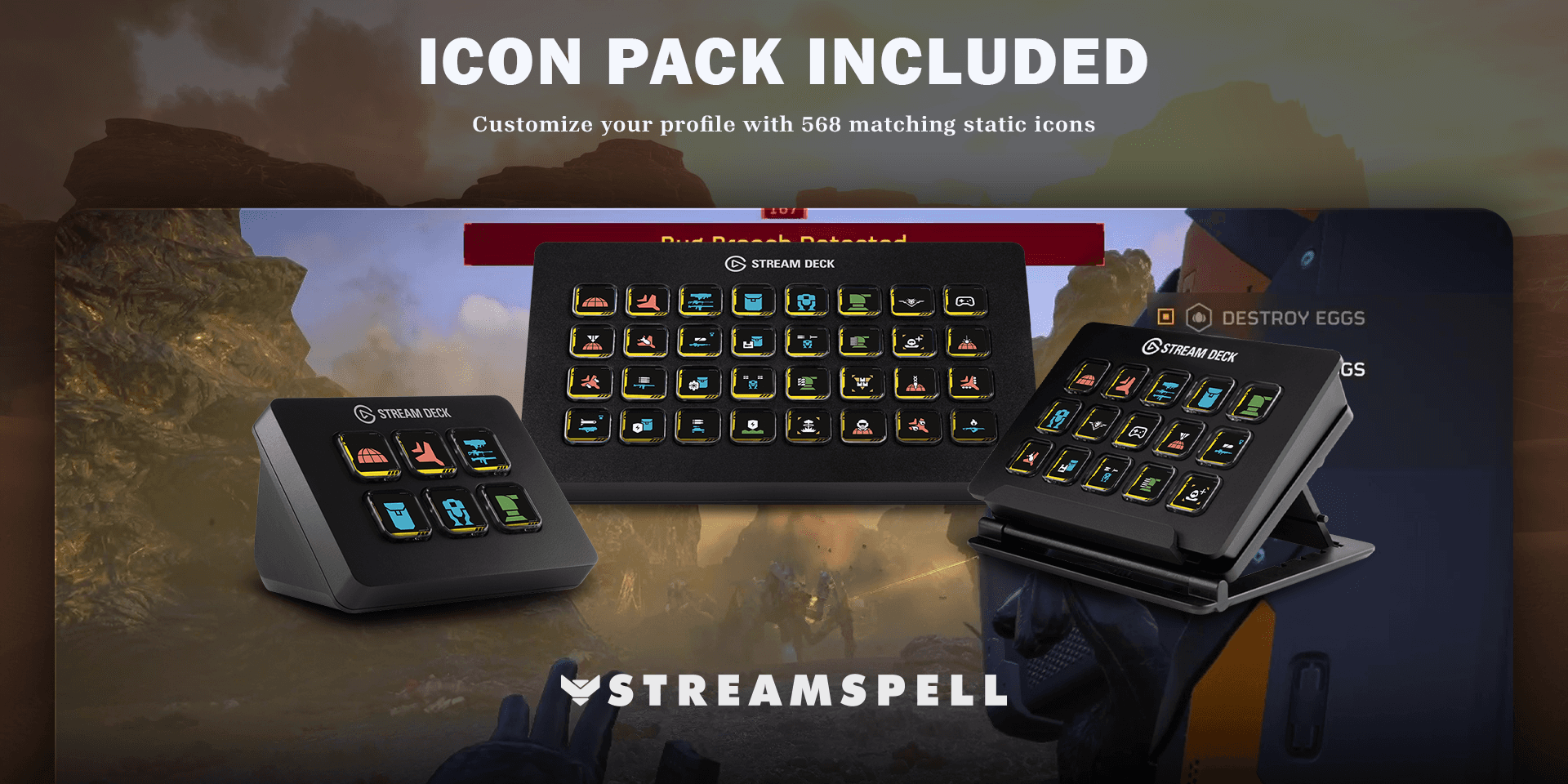
The included icon pack contains 568 distinct 144 × 144 static PNG icons, including matching artwork for all 109 stratagem buttons.
The installable icon pack gives you more than the buttons used in the default layouts. You can customize the supplied profiles, add your own keys and keep the same visual language across categories. Shared symbols are grouped as icon aliases to make the library easier to browse.
What is included?
Seven Windows profiles for Stream Deck Mini, Neo, MK2, Plus, Plus XL, XL and Galleon 100 SD.
109 stratagem sequences and 28 direct controls.
An English Key-Mapping.csv beside the profile files.
An installable icon pack with 568 distinct 144 × 144 static PNG icons.
Matching artwork for all 109 stratagem buttons.
How to set up the Helldivers 2 Stream Deck Profile
In Helldivers 2, open the Mouse & Keyboard bindings for Stratagems.
Set Open Stratagems List to Home in Press mode.
Bind the four stratagem directions to the keyboard arrow keys.
Import the profile prepared for your Stream Deck model.
Install the Stream Deck Key Logic plugin for actions that use HOLD behavior.
Start with the stratagem list closed, press the Stream Deck action, then aim and throw the beacon in-game.
Stratagem availability still depends on your loadout and mission. Some shortcuts require an in-game key binding to match the profile, so feel free to customize the bindings to suit your playstyle.
For the standard import workflow, see Elgato’s official guide: Download and use Stream Deck Profiles.
Helldivers 2 Stream Deck Profile FAQ
Does it automate the game?
No. Every action starts when you press its Stream Deck key. Availability and results depend on your current game state, mission, loadout and matching keyboard bindings.
Are all 109 stratagems available in every mission?
No. The profile provides dedicated actions for the included calls, but Helldivers 2 decides what is available for the current loadout and mission. Mission-objective calls only work in the missions that provide them.
Can I customize the layout?
Yes. You can move actions, add folders and use the included static icon pack for additional keys while keeping the visual system consistent.
Which Stream Deck file should I install?
Install the profile made for your exact device: Mini, Neo, MK2, Plus, Plus XL, XL or Galleon 100 SD.
Explore more gaming Stream Deck profiles
Compare other ready-made game layouts in StreamSpell’s guide to Stream Deck Profiles for gamers.
Get the updated Helldivers 2 profile
View the current product details and get the Helldivers 2 Stream Deck Profile and Icon Pack from StreamSpell.
Independent StreamSpell product. Not affiliated with or endorsed by Arrowhead Game Studios or Sony Interactive Entertainment.
Level up your stream with practical guides for OBS, Twitch, YouTube and Stream Deck.

AI Stream Deck Profile Generator: Build Profiles Faster
Build Stream Deck profiles faster with Deck Smith, a free AI Stream Deck profile generator by StreamSpell.

40 Webcam Overlay Bundle by StreamSpell
Get 40 stream-ready webcam overlays with animated styles, color customization, and themes like anime, neon, RPG, cute, and more.

5 Strategies for Staying Motivated as a Content Creator
Take care of yourself with these quick tips for staying motivated throughout your content creation journey.
Browse All Articles
Browse Stream Overlays