VIEW DEALS

StreamSpell
Diablo 4 Tracker

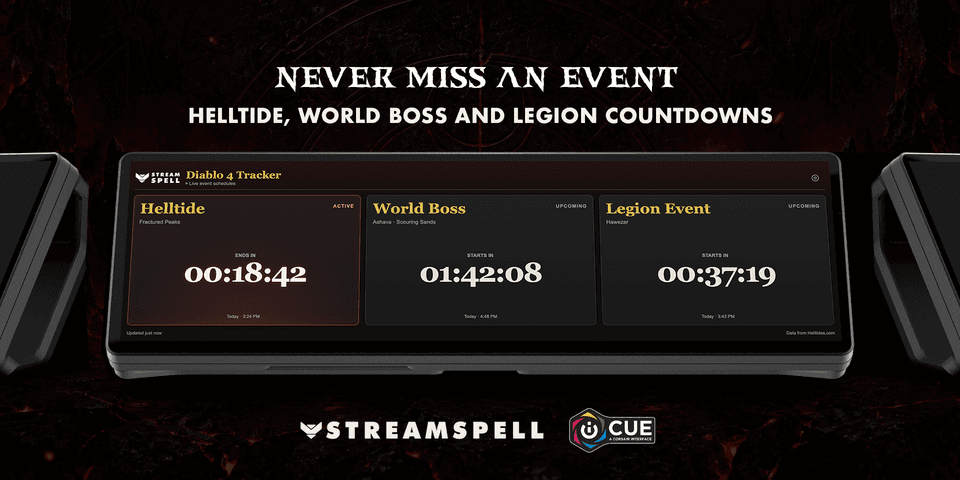
See the next Sanctuary event without keeping a separate event page on your main monitor. Diablo 4 Tracker puts Helltide, World Boss and Legion countdowns on a supported CORSAIR iCUE dashboard, together with each event’s state and location.
The widget is designed for checking what is active and what comes next, rather than controlling your character. Schedule data comes from Helltides.com, with automatic timer updates and a manual refresh option. Your dashboard can stay visible while you decide which event fits your next session.
View Diablo 4 Tracker on Elgato Marketplace.
Know what is active and what comes next
See each event’s current state, location and countdown at a glance. Timers update automatically using event schedule data from Helltides.com.

Track three core Sanctuary events
Follow active and upcoming Helltides.
See the next World Boss countdown and location.
Keep the next Legion Event visible while you play.
Refresh schedules manually whenever you need.
Built for CORSAIR iCUE
Customize the text, accent and background colors, adjust transparency and use layouts designed for supported horizontal and vertical dashboard LCD sizes.
Compatibility: Windows, CORSAIR iCUE 5.47 or newer and a supported dashboard LCD device.
Diablo IV and related names are trademarks of Blizzard Entertainment. StreamSpell is not affiliated with or endorsed by Blizzard Entertainment. Event schedule data is provided by Helltides.com.
Getting started
Check the Windows, iCUE and dashboard requirements above before installing. Add the widget to a supported dashboard layout, then follow the setup steps for this product.
Start with one ordinary action or information view, confirm that it responds, and then adjust the colors and layout for your screen. Available controls and data still depend on the connected app or service.
Get Diablo 4 Tracker on Elgato Marketplace
Check the current listing for the included files, device compatibility and setup requirements, then get Diablo 4 Tracker. The linked product is the exact StreamSpell Marketplace listing described in this guide.
Level up your stream with practical guides for OBS, Twitch, YouTube and Stream Deck.

AI Stream Deck Profile Generator: Build Profiles Faster
Build Stream Deck profiles faster with Deck Smith, a free AI Stream Deck profile generator by StreamSpell.

40 Webcam Overlay Bundle by StreamSpell
Get 40 stream-ready webcam overlays with animated styles, color customization, and themes like anime, neon, RPG, cute, and more.

5 Strategies for Staying Motivated as a Content Creator
Take care of yourself with these quick tips for staying motivated throughout your content creation journey.
Browse All Articles
Browse Stream Overlays